
Article Summary
Nailing virtual interview tips means knowing what hiring managers actually notice on screen. This article covers technical setup, body language, communication strategies, research signals, and post-interview follow-up. You'll leave with actionable, insider-backed guidance to confidently present your best self in any virtual interview.
The way we interview has changed significantly. As remote and hybrid work models become more mainstream, virtual job interviews are now a staple of the hiring process. That means hiring managers are watching with a different lens.
I can still remember how impressed I was when a candidate calmly handled a surprise technical glitch that showed her resilience and communication style more clearly than any of my planned questions could. If that interview had happened in person, I might have missed just how composed and solution-oriented she really was.
This is what I call the virtual advantage — the ability to use the virtual interview format strategically to highlight strengths that might not be as obvious in person. From your setting and setup to your verbal presence and authenticity, you have more control than you may realize. In this guide, we’ll cover what hiring managers really notice in a virtual interview and how you can make the most of every moment.
- Want to feel fully prepared before your next virtual interview? Explore Udemy’s Zoom Job Interviews 2025: Techniques + Strategies course to dive even deeper.
Technical Setup and Environment
How Environment and Technical Readiness Create Unconscious Hiring Biases
Best practice: I always give myself at least 15 minutes before an interview to set up my space and test my tech. It’s not just about avoiding hiccups, it’s about feeling in control. When everything’s working smoothly, I can focus on connecting with the interviewer, not fumbling with the mic.
First impressions count, and in a virtual setting, they often happen in silence. Your background, lighting, and audio create a narrative before you even speak.
Professional Environment Setup
- Choose a background that’s tidy and distraction-free. A blank wall or simple décor works best. Be ready to explain what’s in view, it can become an ice breaker that reveals a lot about your personality.
- Position your light source in front of your face. Natural light is ideal, but a desk lamp works too.
- Frame yourself head and shoulders in the center of the screen. Eye-level camera angles feel most natural.
- Remove clutter from view. A messy bookshelf or laundry pile can suggest a lack of attention to detail.
Consider a virtual background. Be sure it is simple and doesn’t create distraction. Check that it doesn’t visually compete for attention, and that it complements your look.
Technical Readiness Signs Hiring Managers Notice
- Log into the interview platform 10 minutes early to test audio, video, and screen share settings.
- Prepare a backup plan in case of connection issues (phone hotspot, mobile app, or dial-in).
- Use headphones or an external mic to eliminate echo and boost sound quality.
- Have trouble-shooting tips handy. Pull up the help center or online user guide so you can quickly search for a solution should something happen during the interview.
Body Language and Communication Skills
The Virtual Communication Paradox
Best practice: I rehearse with my webcam on, not just for how I sound but to watch how I move. What feels natural in person can look exaggerated or awkward on screen. A dry run helps me fine-tune how I use my eyes, hands, and tone of voice.
In virtual interviews, communication is more fragile. Small delays, off-screen glances, or overly stiff posture can be interpreted in ways you didn’t intend. I really appreciate it when people tell me they are taking notes on a separate screen or piece of paper in front of them. It tells me they’re really paying attention, and explains the off-camera glances.
Non-Verbal Cues That Register Positively
- Keep your camera at eye level to mimic eye contact.
- Use small, intentional hand gestures to emphasize key points without overwhelming the frame.
- Sit upright with an open posture, leaning in slightly to signal engagement.
- If you’re able to, avoid excessive fidgeting or looking away — it can read as distraction.
Verbal Communication Effectiveness
- Pause slightly between thoughts to allow for lag and avoid talking over others.
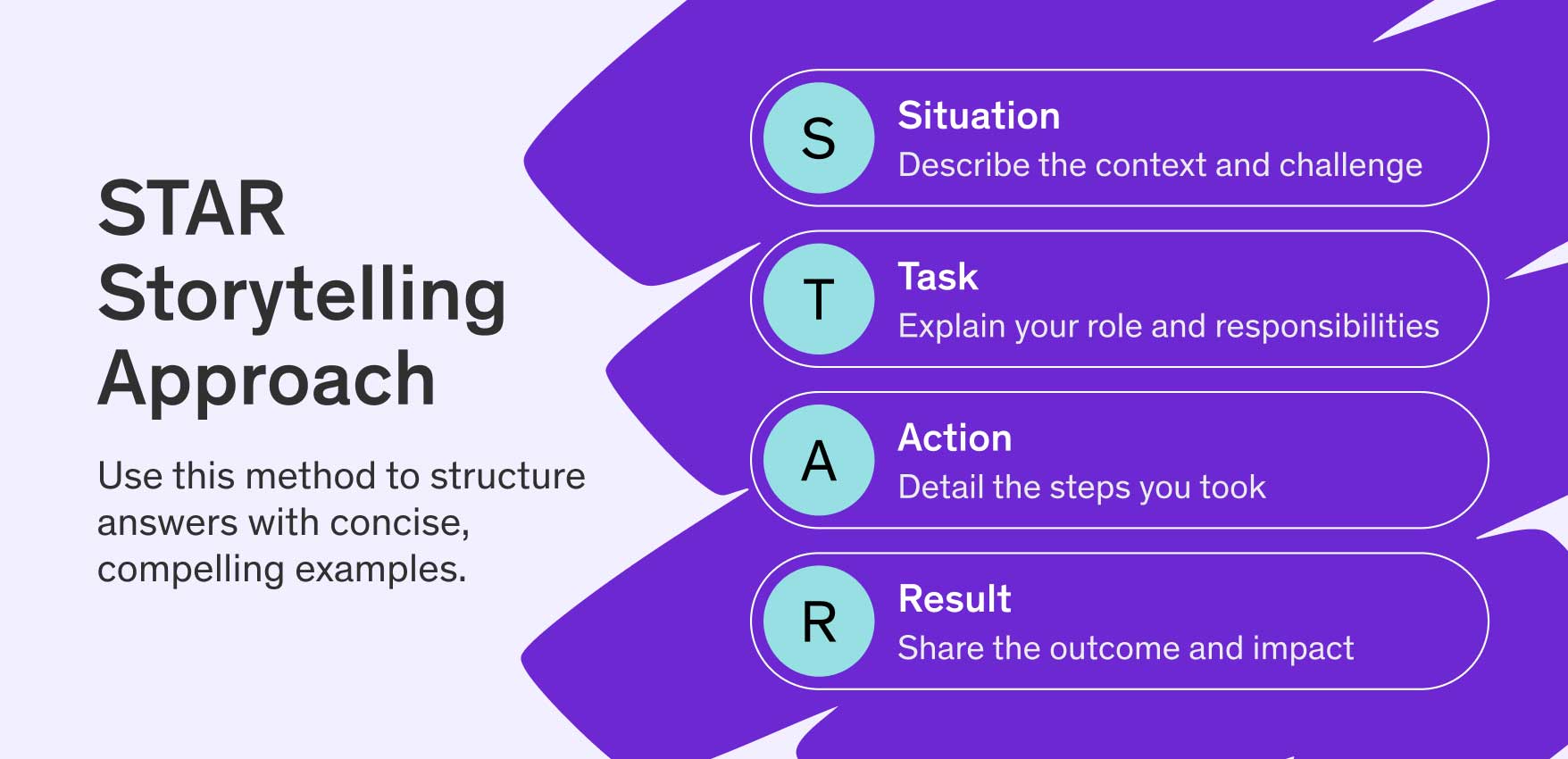
- Use specific, clear storytelling structures like STAR (Situation, Task, Action, and Result) to answer behavioral questions.
- Ask clarifying questions or paraphrase the interviewer to show active listening.
- Vary your tone and inflection to avoid sounding monotone or overly rehearsed.
The STAR Storytelling Approach In Action
The STAR method is a simple way to structure your answers during a job interview by breaking them into four parts: Situation, Task, Action, and Result.
For example, imagine you’re asked about handling a difficult customer. You might say: “At my last job (Situation), I was responsible for resolving customer complaints (Task). One day, a customer was upset about a delayed order, so I apologized, tracked the package, and offered a discount on their next purchase (Action). They ended up leaving a positive review and became a repeat customer (Result).” This format helps you stay clear, focused, and impactful when sharing your experiences.
Want to practice your presence? The Complete Presentation and Public Speaking/Speech Course is a great place to start.
Interview Preparation and Research Evidence
Visibility of Preparation in Virtual Interviews
Best practice: I keep a few sticky notes behind my laptop (never on screen!) with reminders: company mission, recent news, and one smart question. It keeps me grounded without sounding scripted.
Being prepared is always essential, but in a virtual format, it’s easier to hide a lack of preparation. The best candidates find subtle, effective ways to show their homework.
Company Research Indicators
- Reference a recent company milestone or initiative in your answers.
- Connect your skills directly to the company’s strategic priorities or customer challenges.
- Avoid regurgitating content from the homepage. By digging into LinkedIn updates, press releases, or earnings calls you’ll have deeper insights.
Self-Preparation Elements
- Record a practice session and review it to catch filler words, awkward phrasing, or long-winded responses.
- Adapt the STAR method with tighter, clearer responses suited to shorter attention spans on video.
- Visualize success beforehand. A quick mental run-through can calm nerves and improve performance.
The Intangibles: Authentic Engagement
Why Genuine Connection Matters More in Virtual Formats
Best practice: I try to talk to the camera like I’m talking to a colleague I respect. Not too casual, not too stiff. Just present, professional, and real.
Authenticity is harder to project through a screen, but it’s also more important than ever. Cultural fit and collaboration skills are being evaluated from your very first “hello.” In the era of AI, your adaptive skills and ability to convey your ideas, handle difficult conversations, and show up as someone people are going to enjoy working with can go a long way towards winning the job.
Authenticity Markers
- Use the interviewer’s name and smile naturally when greeting them.
- Mention something you genuinely appreciated about the conversation during wrap-up.
- Be yourself. The polished version, not the overly rehearsed one.
- If you make a mistake, it’s OK! Own it, regroup, and try again. Everyone knows that nerves can take over sometimes, it’s how you handle it that matters most.
Red Flags Hiring Managers Notice
What Raises Concerns — Even Virtually
Best practice: Before every interview, I silence notifications, clear my desk, and minimize all other windows. Multitasking might be tempting, but even subtle signs of distraction can be damaging.
Hiring managers are trained to pick up on signals, especially ones that suggest you might struggle in a remote or hybrid role.
Common Virtual Interview Mistakes
- Looking off-screen repeatedly or typing during the conversation.
- Using generic or misaligned responses that show little preparation.
- Speaking too quickly or cutting off the interviewer due to poor timing.
- Using up valuable time on a single question, brevity is key.
Technical Skills Demonstration
How to Show What You Know on Screen
Best practice: I rehearse technical demos out loud, just like I would a presentation. I talk through what I’m doing while I do it, so it’s not just about results, it’s about showing how I think.
In technical interviews, what you demonstrate matters. But how you demonstrate it (clearly, calmly, and visually) is just as critical.
Effective Technical Demonstration Approaches
- Narrate your approach and decision-making process while solving a problem.
- Use screen sharing to walk through your thought process step by step.
- Highlight not just what you built, but why you built it that way.
Portfolio Presentation Best Practices
- Limit what’s on-screen to only what supports your story. Less clutter means more clarity.
- Use headings, visuals, or simple labels to help orient the interviewer.
- Pause periodically to ask if the interviewer has questions or wants to go deeper.
Want more technical interview prep tips? Master the Coding Interview: Big Tech (FAANG) Interviews might be just the course you’re needing.
Post-Interview Follow-Up
Keep the Momentum Going the Right Way
Best practice: I always write down one personal moment or insight right after the interview and include it in my thank-you note. It helps me stand out and makes my message feel meaningful, not templated.
Following up can strengthen your impression or undo it. Done well, it shows your professionalism and continued interest.
Follow-Up Tips
- Send a thank-you email within 24 hours, referencing a specific part of your conversation. If you don’t have the interviewer’s direct email, send your note to the recruiter and ask that they forward it on.
- Reinforce your enthusiasm and share any promised links or materials.
- For longer processes, follow up at key intervals with thoughtful, non-pushy updates.
The skills you learn next could win you the job of your dreams — turn learning into earning with Udemy & Indeed
Whether you’re looking to advance in your current field, transition to a new industry, or simply stay relevant in our rapidly evolving economy, the Indeed and Udemy partnership provides the resources you need.
Explore Udemy’s Personal Plan and check out more courses on interview preparation (and beyond!) to build your skills and confidence before your next big conversation.
Visit Indeed’s special offer page designed exclusively for Udemy learners in North America, to learn more about how Indeed is helping people make career moves.